
I Was Tired of Waiting Weeks for PR Reviews. So I Built an AI That Does It in 40 Seconds.

Every developer has felt it.
You open a Pull Request. You wait.
Day 1 — nothing. Day 3 — still nothing. Week 2 — a maintainer leaves a comment asking you to change one variable name.
You fix it. You wait again.
That cycle? That's not a code review. That's a queue.
I lived in that queue for months — until one day, something changed everything.
The Bot That Changed How I See Open Source
It was January 2026. I was contributing to Open Food Facts — one of the largest open source food databases on the planet. My first four PRs had taken weeks to get reviewed. I'd learned patience the hard way.
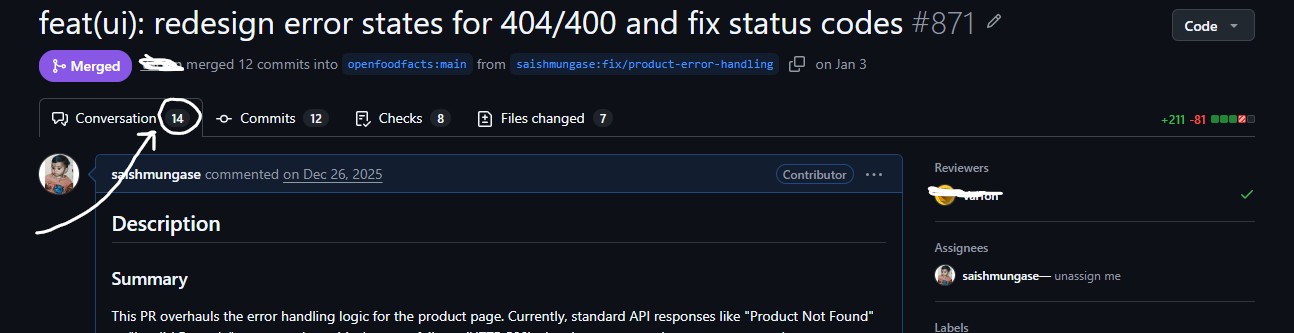
Then in March, something changed.
The maintainers integrated CodeRabbit into the repo.
I opened my next PR. Thirty seconds later, something unexpected appeared on my screen.
A bot. Reviewing my code. Line by line.
![Screenshot of CodeRabbit reviewing a PR — the moment of first seeing it]](https://cdn.hashnode.com/uploads/covers/6a0ff8331f237623eab3452c/a60016a3-c20b-47f2-b606-8d8b17e40c6c.png align="center")
It wasn't just leaving generic comments. It found an actual bug I had missed. It suggested a fix. It explained why the fix mattered.
In under a minute, it had done what took human reviewers weeks.
That was my first time seeing AI working in open source. And it changed everything.
Instead of dreading the review process, I started opening PRs faster. I went from 4 slow PRs to 9 merged PRs across their explorer and JS projects in the months that followed. The bot kept me moving.
Fast Forward — The Itch I Couldn't Scratch
A few days ago, I was randomly surfing LeetCode discussions. Nothing specific — just the usual late-night developer procrastination.
Then I flipped over to GitHub. Just to check some repo counts.
And I saw it — a fork of Open Food Facts. My old stomping ground.
It pulled me back into that memory. CodeRabbit. The 40-second review. The fascination.
And then a thought hit me:
"How hard would it actually be to build one of these?"
I started researching. And what I found surprised me.
These agents — under the hood — are doing something deceptively simple:
git diff HEAD~1 HEAD
They get the changed files. They send the diff to an LLM. The LLM reviews it.
That's the core. Smart? Yes. But also... limited.
The Problem Nobody Was Solving
Here's the thing about reviewing just the diff.
If I change auth.service.py — the diff shows what changed in that file. The AI reviews those changes. Done.
But what if another file — user.controller.py — imports from auth.service.py? The change might break it. The diff doesn't show that file. The AI doesn't know.
What if the codebase uses a newer version of a library, but the PR is written in old syntax that was deprecated in that version? The diff doesn't show the rest of the codebase. The AI can't catch it.
These are the gaps. The blind spots. And nobody was filling them.
| What the diff shows | What the codebase knows |
|---|---|
| Changed lines of code | How the change impacts the entire application |
| Modified files | Where the code is connected and reused |
| Newly added syntax | Which framework and library versions are actually used |
| Renamed methods or variables | All dependent references across the repository |
| Surface-level code edits | Semantic meaning, architecture, and runtime behavior |
That's when RAG clicked in my head.
The Idea — Give the Agent Memory
RAG = Retrieval Augmented Generation.
Instead of sending just the diff to the AI — what if I first searched the entire codebase for relevant context, then sent both the diff AND that context together?
The AI would now know:
What changed (from the diff)
What it affects (from the codebase search)
How the rest of the system works (from the embeddings)
It would stop being a diff reader. It would become a codebase-aware reviewer.
That's the idea behind Pruvy.
Building It — The Full Architecture
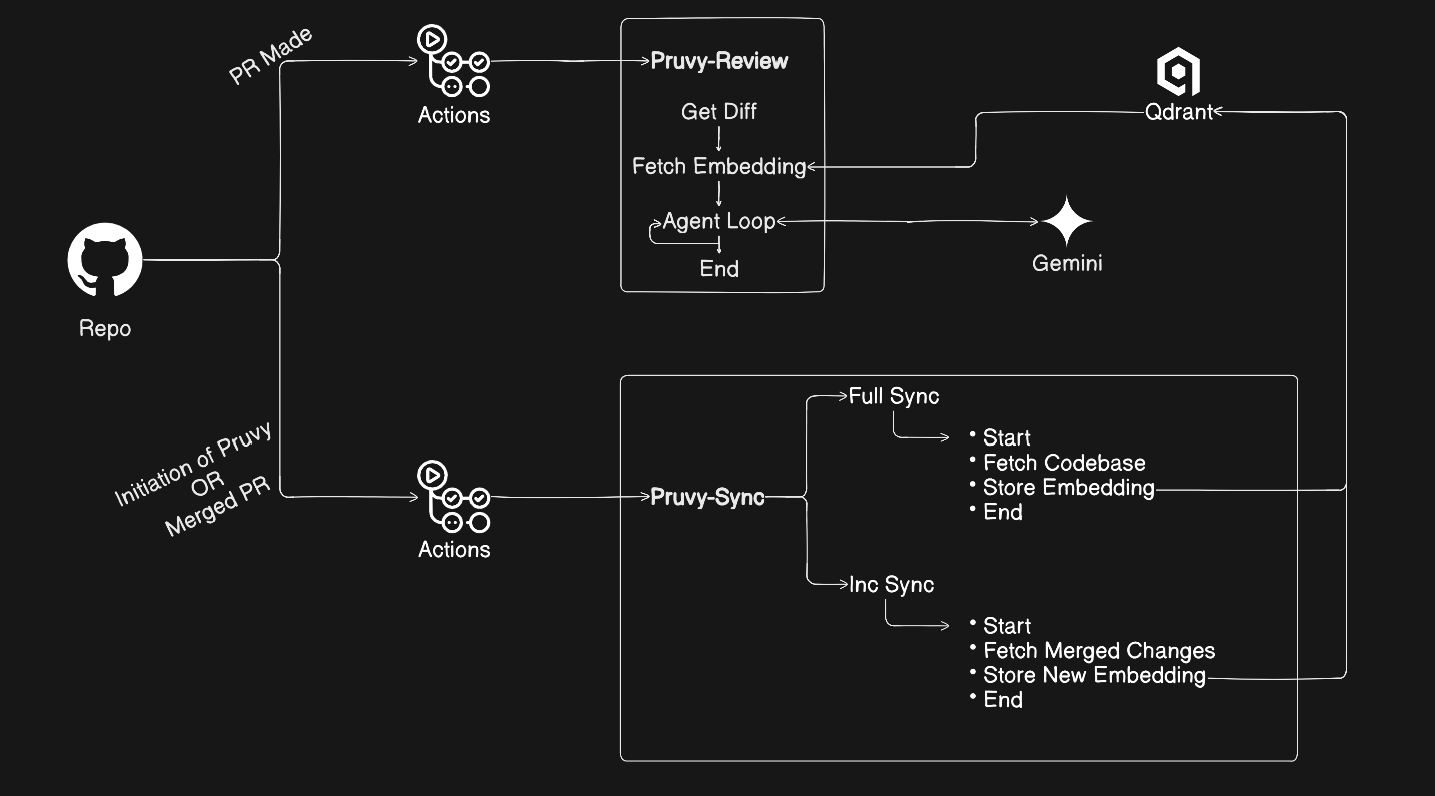
Let me walk you through exactly how it works.
Step 1 — The Embedding Sync
Before Pruvy can review anything, it needs to know the codebase.
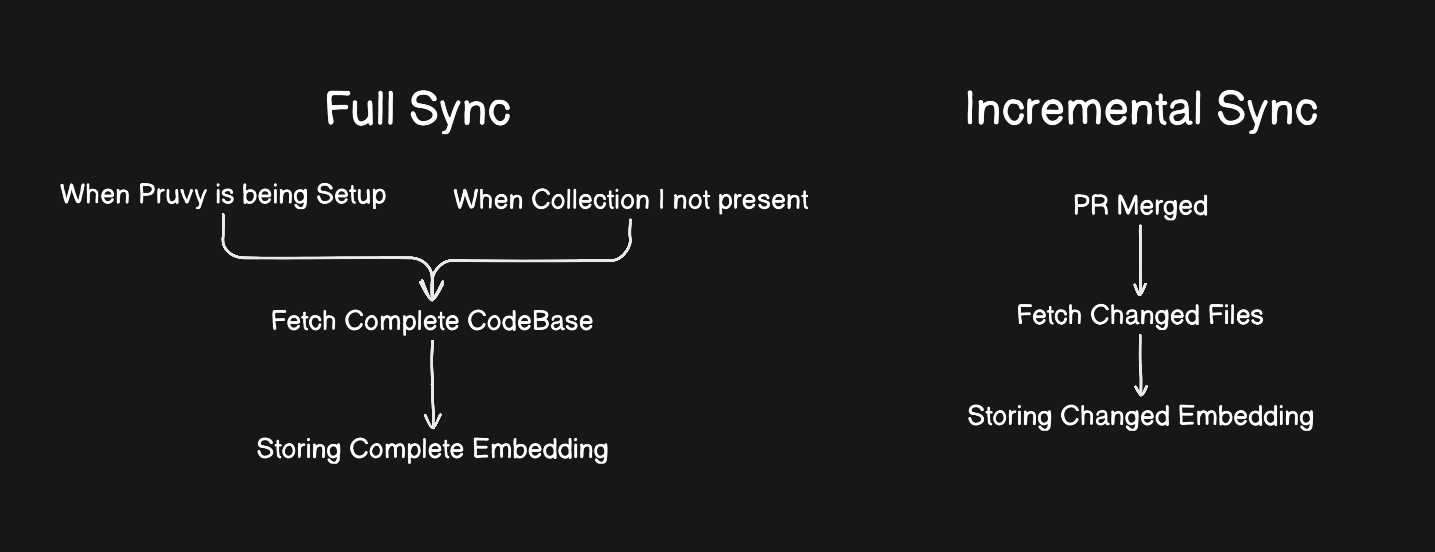
The first time you integrate Pruvy, it performs a full sync — it reads every code file in your repo, converts each one into a vector embedding, and stores it in Qdrant (a vector database).
def full_sync():
    files = github_client.get_all_files()
    for file in files:
        vector = embed_text(file.content)
        qdrant.upsert(file.path, vector)
After the initial sync — every time a PR gets merged into main, Pruvy performs an incremental sync. It only re-embeds the files that actually changed:
def inc_sync():
    changed = get_changed_files_after_merge()
    for file in changed:
        if file.status == "removed":
            qdrant.delete(file.path)
        else:
            qdrant.upsert(file.path, embed_text(file.content))
Why this matters: The codebase embeddings are always fresh. Always accurate. Pruvy never reviews with stale context.
Step 2 — PR Opens, Agent Wakes Up
When a developer opens a Pull Request — GitHub Actions triggers automatically.
Pruvy wakes up.
First, it fetches the PR diff — every file that changed, and exactly what changed in each one:
def get_pr_diff():
    url = f"api.github.com/repos/{repo}/pulls/{pr_number}/files"
    files = requests.get(url, headers=auth_headers).json()
    return [FileObject(f["filename"], f["patch"], f["status"]) for f in files]
Step 3 — Semantic Search for Context
Here's where Pruvy separates itself from every basic PR reviewer.
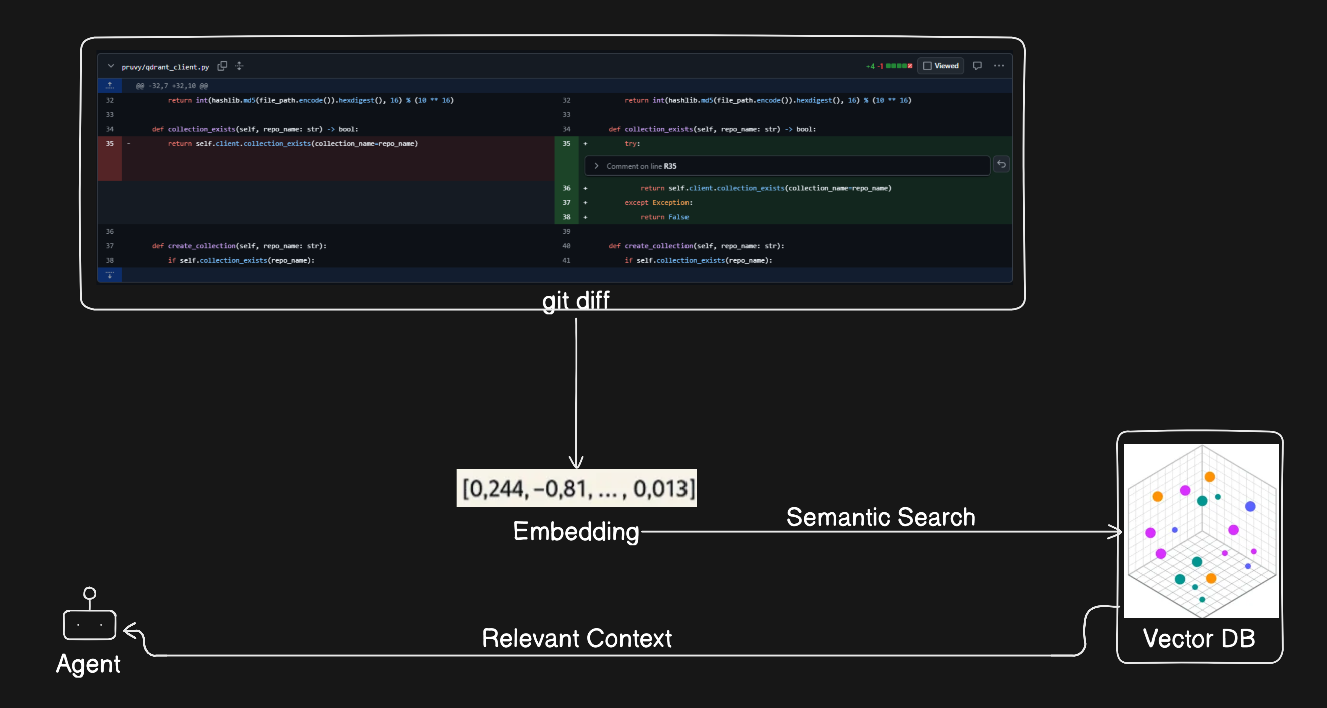
For each changed file, Pruvy searches Qdrant for the most semantically similar existing code:
def search_codebase(query: str, limit: int = 5):
    search_vector = embed_text(query)
    results = qdrant.query_points(
        collection_name=collection_name,
        query=search_vector,
        limit=limit
    )
    return results
The diff goes in as a query. The most relevant existing code files come back as context.
Example: If a PR changes authentication logic — Qdrant might return the existing auth middleware, the user model, and the session handler. Now the AI knows the full picture.
Step 4 — The Agent Does Its Work
This is the brain of Pruvy.
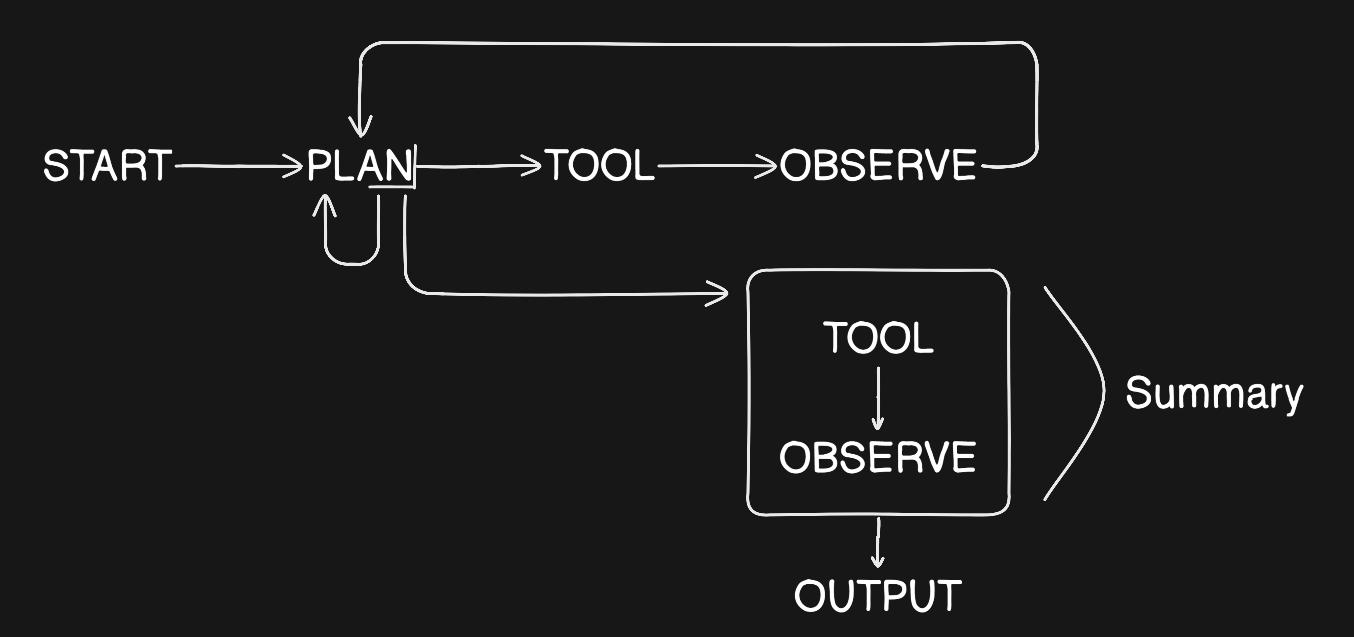
I built it using the ReAct pattern — a Chain of Thought approach where the agent thinks step by step, takes actions, observes results, and thinks again.
(I wrote a deep-dive on this exact pattern in my previous blog — read it here if you want the full technical breakdown.)
The agent follows a strict state machine:
START → PLAN → TOOL → OBSERVE → TOOL → OBSERVE → ... → OUTPUT
In plain English:
1. START   — "I have a PR to review. Let me begin."
2. PLAN    — "I'll review auth.service.py first, then user.controller.py"
3. TOOL    — add_comment(file, line, "This breaks the existing auth pattern")
4. OBSERVE — "Comment posted"
5. TOOL    — [moves to next file, repeats the cycle]
... continues until all files reviewed
8. TOOL    — post_summary("Here's the full review...")
9. OUTPUT  — Done
The agent doesn't stop after finding one issue. It keeps going. File by file. Issue by issue. Until everything is reviewed.
Step 5 — Comments Land on the PR
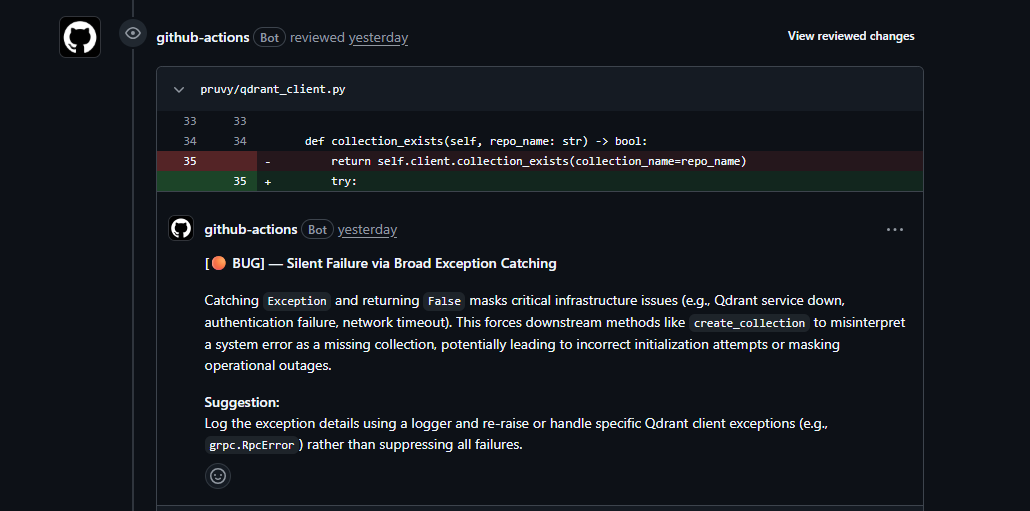
When the agent finds an issue, it posts an inline comment on the exact line where the problem exists:
def post_comment(file_path: str, line: int, body: str):
    url = f"api.github.com/repos/{repo}/pulls/{pr_number}/comments"
    payload = {
        "body": body,
        "path": file_path,
        "line": line,
        "commit_id": commit_sha
    }
    requests.post(url, json=payload, headers=auth_headers)
Not a generic comment at the bottom. A surgical, line-level comment that tells the developer exactly what's wrong, why it matters, and how to fix it.
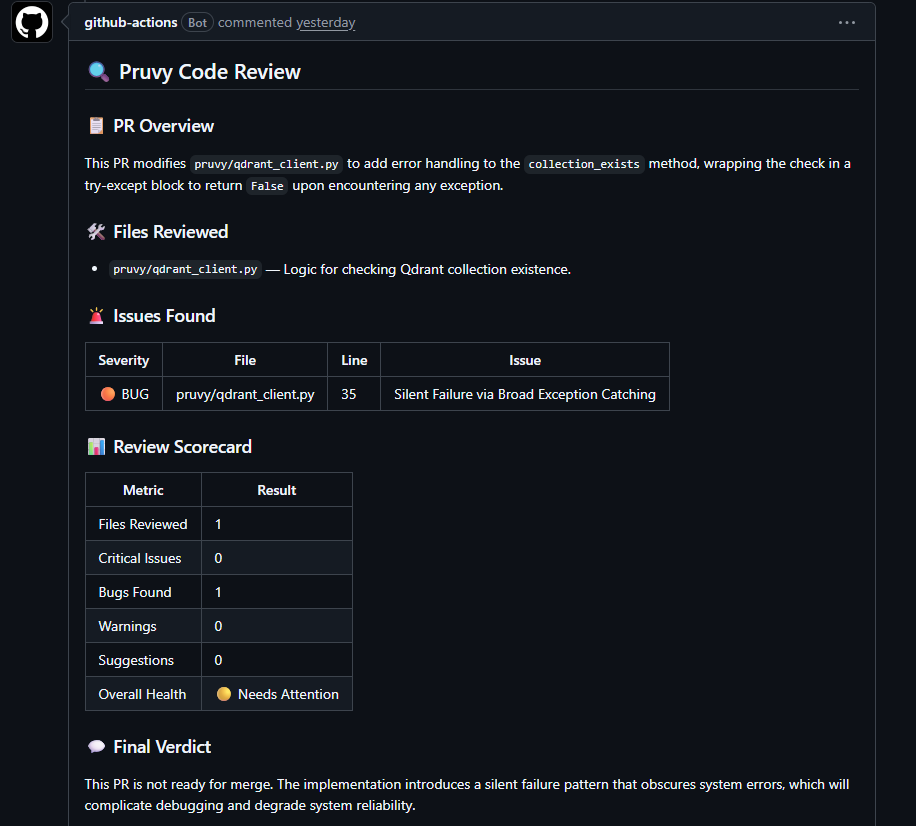
And when the full review is complete — Pruvy posts a structured summary covering every file reviewed, every issue found, and an overall health scorecard.
How To Use Pruvy In Your Repo — 3 Steps
The best part? It's completely free. Open source. And takes about 5 minutes to set up.
Step 1 — Get your free credentials:
Qdrant — free tier, no credit card needed
Google AI Studio — free Gemini API key
Step 2 — Add secrets to your GitHub repo:
Go to Settings → Secrets → Actions → New repository secret
GEMINI_API_KEY   → your Gemini key
QDRANT_API_KEY   → your Qdrant API key
QDRANT_URL       → your Qdrant cluster URL
GITHUB_TOKEN is provided automatically by GitHub — no setup needed.
Step 3 — Copy the workflow files:
Copy both files from the examples folder into your repo:
your-repo/
  .github/
    workflows/
      pruvy.yml          ← PR review trigger
      emb-sync.yml       ← embedding sync trigger
Open a PR. Watch Pruvy work.
What Makes Pruvy Different
| Feature | Basic PR Bots | Pruvy |
|---|---|---|
| Reviews the diff | ✅ | ✅ |
| Understands codebase context | ❌ | ✅ |
| Catches cross-file impacts | ❌ | ✅ |
| Detects version/syntax mismatches | ❌ | ✅ |
| Inline line-level comments | ✅ | ✅ |
| Full structured PR summary | Sometimes | ✅ Always |
| Free to use | ❌ Usually paid | ✅ Completely free |
| Open source | ❌ | ✅ |
What I Learned Building This
Three days. One idea. A working open source tool.
Here's what surprised me most building Pruvy:
RAG is simpler than it sounds. Once you understand that embeddings are just "meaning converted to numbers" — the whole system clicks. Search by meaning, not by keywords.
GitHub Actions is underrated. The entire infrastructure runs on GitHub's servers. Zero hosting cost. Zero maintenance. Every PR triggers its own isolated container automatically.
The prompt is the product. I spent more time crafting the agent's system prompt than writing any other part of the code. A bad prompt = a useless agent. A great prompt = Pruvy.
What's Next
Pruvy is v0.1.0. There's a lot more coming:
Custom GitHub App — so it shows "Pruvy" instead of "github-actions[bot]"
Multi-language awareness — deeper understanding of language-specific patterns
PR approval — Pruvy will be able to approve clean PRs automatically
Metrics dashboard — track code quality patterns over time
Try It. Break It. Contribute.
Pruvy is open source. Everything is public. If you find a bug — open an issue. If you have an idea — open a PR.
Pruvy will review it. 😄
GitHub: github.com/saishmungase/pruvy
Install:
pip install pruvy
One Last Thing
That CodeRabbit bot that reviewed my PR in March — it made me open 9 more PRs across two projects.
Not because it was perfect. But because it was fast. It kept me moving.
If Pruvy does that for even one developer — helps them ship faster, catch bugs earlier, contribute more confidently — then the three days it took to build were absolutely worth it.
Now go open a PR.
Pruvy's waiting. 🤖
#buildinpublic #agenticai #rag #opensource #github #devtools #python
